
Affiliate Disclosure: As an Amazon Associate, we earn from qualifying purchases.
Tip: Check the latest price, product details, and current availability on Amazon or the retailer page before making a final decision.
If you are tired of untangling charging cables, hunting for the right cord behind your desk, or stuffing loose wires into a bag, you are not alone. Cable clutter is a small problem that can quietly eat up time and patience. The challenge is that the category is full of very different solutions, from simple ties to under desk trays, and what works for one person may be useless for someone else.
This guide covers 10 cable organizers in 2026, ranging from budget friendly clips to more substantial trays. We focus on the practical differences that actually matter, such as how many cables you need to manage, where you want to use them, and how much installation effort you are willing to put in. By the end, you will know which type of organizer fits your situation, whether you are tidying a home office, protecting cables from pets, or keeping travel gear neat.


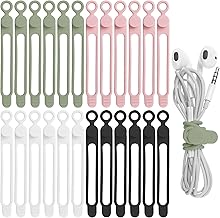

Choosing the right cable organizer comes down to matching the product to your specific cable situation. Here are the key factors to consider before you buy.
Number of Cables and Capacity
Start by counting how many cables you need to manage. A simple desk with a phone charger, a laptop charger, and a mouse cable might only need a few clips or ties. A full home office setup with a monitor, external drives, and multiple devices can quickly overwhelm small organizers.
For larger setups, consider products that bundle multiple cables together, like the Alex Tech 10ft – 1/2 inch Cord Protector Wire Loom, or a tray that hides the mess under the desk. For lighter needs, a pack of reusable ties or clips is often enough. Buying a set with more pieces than you need today can save you a trip later, but avoid overbuying if you only have a few cables.
Installation and Mounting Options
Think about where you plan to attach the organizer. Adhesive backed clips and mounts are easy to install on smooth surfaces like desks, walls, or the side of a monitor. They require no tools and can be repositioned if you are careful, but they may not stick well to textured surfaces or hold up under heavy weight.
Under desk trays with clamps, like the No Drill Under Desk Cable Management Tray or the Under Desk Cable Management Tray White, avoid adhesives altogether and can be more secure. These are better if you have heavy power strips or multiple thick cables. Just make sure your desk edge is compatible with the clamp size before buying.
Portability and Travel Use
If you travel with electronics, you need organizers that keep cables tidy in a bag without adding bulk. Reusable cable ties, like the Nettbe 60 PCS 6 Inches Reusable Cable Ties or the MVYC 120PCS 6 Inch Cable Ties Reusable, are lightweight and take up almost no space. They are perfect for wrapping chargers, earbuds, and spare cables before tossing them into a backpack.
For a more structured option, a pouch like the Wrist Strap, Waterproof, Double Layers can keep everything in one place inside your bag. This is especially useful if you carry multiple cables and adapters and want to avoid digging through a mess to find the right one.
Protection and Durability
Some cable organizers do more than just reduce clutter; they also protect your cables from damage. If you have pets that like to chew on cords, a protective sleeve like the Alex Tech 10ft – 1/2 inch Cord Protector Wire Loom can be a smart investment. It wraps around the cable to create a barrier.
For everyday use, look for organizers made from sturdy materials. Silicone ties are flexible and gentle on cable insulation, while adhesive clips should have a strong grip to avoid falling off. If you are organizing cables that are frequently plugged and unplugged, make sure the organizer can handle repeated use without breaking.
Ease of Access and Adjustability
Consider how often you need to unplug or swap cables. Reusable ties with a simple wrap and release design are quick to adjust, but they can be a hassle if you are constantly adding or removing cables. Clips that hold a single cable are great for frequently used chargers, but they can become crowded if you have many cables in the same spot.
Adjustable options, like the aprx 0.3in Cable Compatible,Strong Adheive Wire Holder Keeper, let you add or remove cables without unthreading everything. This is handy for a desk where you occasionally plug in a tablet or camera. For a more permanent setup, a tray that holds a power strip and all the cables out of sight might be the better choice.
Compatibility with Your Devices
Not all cables are the same thickness. Thick charging cables for laptops or gaming devices may not fit through narrow clips or sleeves. Check the diameter of your cables against the organizer’s opening size if that information is available. The Alex Tech cord protector, for example, is designed for cables up to a certain width, so measure your thickest cable before buying.
Also think about the types of devices you are organizing. If you have a standing desk, you might need a tray that attaches securely to the desk frame. If you are organizing cables for a TV setup, longer sleeves or a larger tray may be necessary to cover the distance between outlets and devices.
Aesthetics and Space
Finally, consider how the organizer looks in your space. If your desk is visible and you care about aesthetics, you might prefer sleek clips or a white tray that blends in. If the organizer will be hidden under the desk or behind a TV stand, appearance matters less than function.
Space is also a factor. A large tray might hold everything but take up valuable under desk space. A small clip might be invisible but only handle one cable. Balance your need for capacity with the physical footprint you are willing to give up.
Why You Should Trust Us
We compare the available specifications, features, use cases, and documented buyer feedback to identify meaningful differences between products. Our goal is to help you make an informed decision based on what matters most for your specific situation, not to push a single “best” option. We rely on the product data provided and highlight practical trade-offs that might not be obvious from a quick glance.
We do not claim to have tested these products ourselves. Instead, we analyze the information that is publicly available, such as listed features and general customer feedback patterns, to give you a clear picture of what each type of organizer can and cannot do. This approach helps you avoid common pitfalls and choose a solution that fits your real world needs.
Final Thoughts
For most people, the right cable organizer is the one that matches the scale of the problem. If you just need to keep a few charging cables from tangling in your bag, a pack of reusable ties like the Nettbe 60 PCS 6 Inches Reusable Cable Ties is a low cost, no fuss solution. If you are dealing with a permanent desk setup with many cables, a tray like the No Drill Under Desk Cable Management Tray offers a more substantial fix.
For travelers and minimalists, the Wrist Strap, Waterproof, Double Layers pouch provides a compact way to keep all your cables in one place. And if you have pets or want to protect longer cable runs, the Alex Tech 10ft – 1/2 inch Cord Protector Wire Loom is a practical addition. Think about your daily routine, how many cables you actually use, and where you want to keep them, and the right choice becomes clear.
Frequently Asked Questions
What are the different types of cable organizers?
Cable organizers generally fall into a few categories: ties and wraps for bundling individual cables, clips and holders for routing cables along surfaces, sleeves and looms for protecting longer runs, and trays or pouches for hiding and storing multiple cables in one place. The best type depends on whether you need portability, protection, or a permanent setup.
How do I choose the right size cable organizer?
Start by measuring the diameter of your thickest cable and consider the total number of cables you need to manage. For clips and sleeves, check the maximum cable diameter they can accommodate. For trays and pouches, think about the volume of cables and power adapters you need to store. When in doubt, choose a slightly larger option to avoid a tight fit.
Can I use cable organizers with a standing desk?
Yes, but you need to choose organizers that can move with the desk. Under desk trays with clamps, like the No Drill Under Desk Cable Management Tray, are a good option because they attach securely to the desk surface. Avoid adhesive clips that might peel off when the desk moves. Also, make sure there is enough slack in your cables to allow for height adjustments.
Are reusable cable ties better than single use zip ties?
Reusable ties are more flexible because you can undo and readjust them whenever you add or remove cables. They are also more environmentally friendly since they can be used many times. Single use zip ties are fine for permanent installations, but they can damage cables if you overtighten them and you have to cut them off to make changes. For most people, reusable ties are the more practical choice.
How do I keep cable clips from falling off?
Clean the surface with rubbing alcohol before applying the adhesive and let it dry completely. Press firmly for at least 30 seconds and wait a few hours before attaching any cables. Avoid sticking clips to textured or dusty surfaces. If you need to move a clip, gently pry it off and use a new adhesive pad if possible.
Can cable organizers protect my cords from pets?
Some organizers, like the Alex Tech 10ft – 1/2 inch Cord Protector Wire Loom, are designed to create a protective barrier around the cable. This can deter chewing, but no organizer is completely pet proof. For the best protection, combine a sleeve with bitter tasting sprays or keep cables out of reach when possible.
What is the best way to organize cables for travel?
For travel, use a combination of reusable ties to keep individual cables from tangling and a small pouch to keep everything together. The Wrist Strap, Waterproof, Double Layers pouch is a good example of a compact solution. Wrap each cable loosely, secure it with a tie, and place it in the pouch. This makes it easy to find what you need without unpacking everything.
Are under desk cable trays worth it?
Under desk trays are worth it if you have a lot of cables and want to keep them off the floor and out of sight. They are especially useful for home offices where you have a power strip, multiple chargers, and peripheral cables. They do require some installation and take up space under the desk, so they are not ideal for minimal setups or desks with limited clearance.
How many cable organizers do I need?
It depends on the number of cables you have and how you use them. A simple setup might only need a few clips or ties. A more complex setup with a desktop computer, monitor, and multiple peripherals might benefit from a combination of a sleeve for the main cable run, clips for frequently used chargers, and a tray for the power strip. Start with the minimum you think you need and add more if necessary.
Can I use cable organizers for non electronic cables?
Yes, cable organizers work well for any type of cord, including headphone wires, charging cables for other devices, and even string lights. Reusable ties and clips are versatile enough for a variety of uses. Just be mindful of the cable thickness and weight to ensure the organizer can handle it.
More Practical Buying Guides
If you are setting up a home office, you might also be interested in our guide to the best coffee makers for small spaces to complete your workspace. For kitchen organization, check out our picks for the best pan organizers to keep your cabinets tidy.