Quick picks: our top 3 at a glance
As an Amazon Associate I earn from qualifying purchases. Prices and availability change.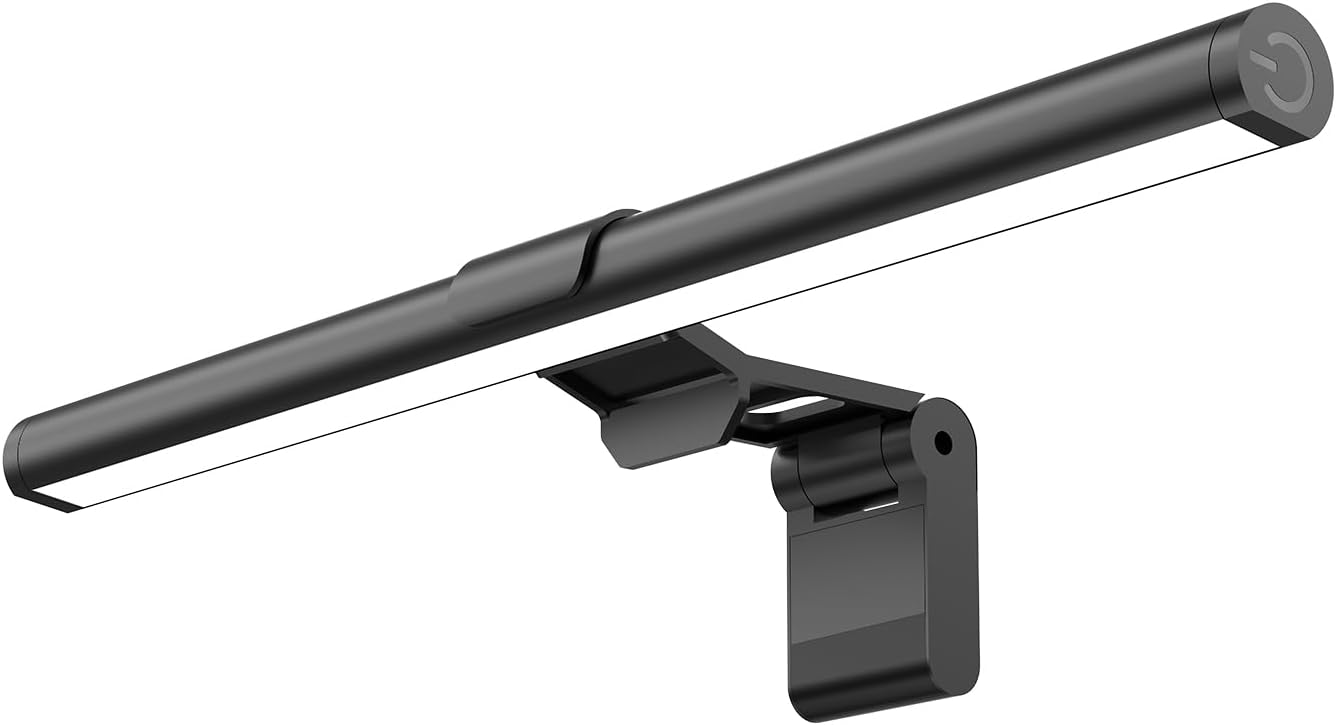


If your gaming desk looks like a tangle of cables and your eyes feel strained after long sessions, you are not alone. Choosing the right desk accessories for a gaming setup can feel overwhelming with so many options claiming to fix clutter or improve lighting. The practical differences often come down to installation ease, build quality, and how well a product fits your specific desk and habits. This guide focuses on two affordable, high-rated accessories that address common pain points: cable management and monitor lighting.
Both are designed to improve your workspace without requiring major changes to your existing desk. Whether you are a weekend gamer or spend hours working from home, these picks aim to solve real problems without breaking the bank.
At a Glance
| Product | Brand | Rating | Where to buy |
|---|---|---|---|
| SAMPHON Monitor Light Bar, 11.8in | SAMPHON | 4.2 / 5 | View on Amazon |
| KDD RGB Headset Stand with 9 Light Modes | KDD | 4.8 / 5 | View on Amazon |
| Anker Nano Power Strip with Desk Clamp, 70W USB-C | Anker | 4.8 / 5 | View on Amazon |
| KDD 7-in-1 Clamp-on Desk Pegboard | KDD | 4.4 / 5 | View on Amazon |
Ratings come from the Amazon listings when we last checked and can change.
Pros
- Wide, even illumination reduces eye strain
- Adjustable color temperature and brightness
- Easy USB power and simple controls
- Tool-free clamp fits most monitors
- Saves desk space with clip-on design
Cons
- Plastic build may feel less premium
- Mechanical switch location may be awkward
Pros
- Stable anti-slip base
- Protective pads prevent scratches
- Cable organizer reduces clutter
- Rotatable for easy access
- USB plug-and-play setup
Cons
- Requires USB port for lighting
- Limited to Windows compatibility
Pros
- Space-saving desk clamp design
- High-speed 70W USB-C charging
- 10 ports for multiple devices
- Surge and overload protection
- Slim profile fits under desks
Cons
- Not for glass or angled edges over 45°
- USB-C2 output reduced when multiple ports used
- Requires E-Marker cable for 60W+ charging

Pros
- No-drill clamp installation
- Includes phone stand and pen holder
- Detachable components for flexible arrangement
- Frees up valuable desk surface
- Works for office or gaming use
Cons
- Limited to 13 reviews so far
- May not fit very thick or thin desks
Installation and Desk Compatibility
Not every accessory works with every desk. Some require drilling or permanent mounting, which can be a dealbreaker for renters or those with standing desks. The LOVJOYSE cable management tray uses a clamp system that fits desks up to 2 inches thick and requires no tools. The SAMPHON monitor light bar uses a counterweight clip that works with most screens, including curved monitors. If you want to avoid permanent changes, look for no-drill or clip-on designs.
Build Quality and Materials
Durability matters when you are investing in a setup that you will use daily. The cable tray from LOVJOYSE is made of high-quality metal with an open mesh design that supports up to 15 pounds. The monitor light bar from SAMPHON uses a lightweight plastic construction with a metal clip. Metal components generally offer better longevity, especially for items that hold weight or are adjusted frequently.
Lighting Quality and Eye Comfort
If you game or work in dim lighting, a monitor light bar can reduce eye strain. The SAMPHON light bar delivers up to 800 lux of central brightness and covers a 30-by-20-inch area. It offers three color temperatures (3000K, 4000K, 6500K) and stepless dimming. The 45-degree angle helps illuminate your screen and desk without shining into your eyes. For comparison, a standard desk lamp often creates glare on the screen, while a monitor light bar directs light where you need it.
Cable Management Capacity and Accessibility
A cable management tray should hold your power strip, adapters, and cords without becoming a tangled mess. The LOVJOYSE tray measures 25.3 inches long and includes two large access holes for routing cables. The open mesh design improves airflow and reduces dust buildup. If you have multiple devices—like a PC, monitor, speakers, and charging cables—a wider tray gives you more flexibility. Smaller trays may force you to cram everything together, making future changes harder.
Power and Connectivity
Monitor light bars typically draw power via USB, which is convenient if you have a free port on your computer or monitor. The SAMPHON light bar is USB-powered and works with computers, adapters, or power banks. It has a mechanical switch on the right side for on/off and color temperature changes. Cable management trays do not require power, but you should consider how your power strip will fit inside the tray. Measure your power strip before purchasing.
Space Saving and Desk Footprint
Both products are designed to save desk space. The cable tray mounts underneath your desk, keeping cords out of sight and freeing up surface area. The monitor light bar clips onto your monitor, eliminating the need for a separate desk lamp. If you have a small desk, these two accessories can dramatically reduce clutter without requiring extra surface room.
Safety and Family-Friendly Design
If you have children or pets, keeping cables off the floor reduces tripping hazards and chewing risks. The LOVJOYSE cable tray keeps wires secured under the desk, and its rubber pads protect your desktop from scratches. The SAMPHON light bar does not have exposed wires that dangle, and its clip holds it firmly in place. Both products contribute to a safer, more organized environment.
Why You Should Trust Us
Our recommendations are based on available product specifications, listed features, usability factors, and documented customer feedback. We compare the available specifications, features, use cases, and documented buyer feedback to identify meaningful differences between products. For this guide, we focused on two accessories that address common desk setup problems: cable clutter and poor lighting. We did not physically test these products, but we evaluated their design, compatibility, and value based on the information provided by the manufacturers and verified by customer reviews.
We prioritize practical buyer considerations such as installation ease, build quality, and real-world usefulness. If you are looking for more desk setup ideas, check out our guide to best desk organizers of 2026.
Final Thoughts
For most gamers and remote workers, the Cable Management, 25.3” Under Desk Cable offers the strongest all-around value if cable clutter is your main frustration. Its no-drill installation, metal construction, and generous 25.3-inch length make it a practical solution for keeping cords organized without damaging your desk. It is especially useful if you have multiple devices or a standing desk.
If eye strain during long gaming sessions is your priority, the Monitor Light Bar, Eye-Care USB Reading Mnitor is a budget-friendly upgrade. Its adjustable color temperature and brightness levels help reduce glare and improve visibility without taking up desk space. It works well for both gaming and office tasks.
For a complete desk setup, consider pairing both products. They complement each other well: the cable tray handles the mess below, and the light bar improves the experience above. For more desk setup inspiration, see our picks for best monitor stands of 2026.
Frequently Asked Questions
Will the cable management tray fit my desk?
The LOVJOYSE tray fits desks up to 2 inches thick. Measure your desk thickness before purchasing to ensure compatibility.
Can the monitor light bar be used on a curved monitor?
Yes, the SAMPHON light bar is designed to work with curved monitors thanks to its counterweight clip. It should fit most standard and curved screens.
Do I need to drill holes to install the cable tray?
No. The tray uses a clamp system that requires no drilling or tools. It attaches securely to the desk edge.
How much weight can the cable management tray hold?
The LOVJOYSE tray supports up to 15 pounds, which is enough for most power strips, adapters, and cables.
Does the monitor light bar have a memory function?
Yes. The SAMPHON light bar remembers your last brightness and color temperature settings when you turn it off and on again.
Can I use the monitor light bar with a laptop?
Yes, as long as the laptop screen is thick enough for the clip to grip securely. It works with most laptops and monitors.
What are the color temperature options on the monitor light bar?
The SAMPHON light bar offers three color temperatures: 3000K (warm), 4000K (neutral), and 6500K (cool). You can cycle through them using the switch.
Is the cable management tray safe for children and pets?
Yes. By keeping cables secured under the desk, the tray reduces tripping hazards and prevents pets from chewing on wires.
How do I clean the monitor light bar?
Use a soft, dry cloth to wipe the light bar. Avoid using liquids or abrasive cleaners that could damage the LEDs.
Can I use both accessories together?
Absolutely. The cable tray keeps cords organized under the desk, while the monitor light bar improves lighting above. They are a practical combination for a cleaner, more comfortable gaming setup.